
Introduction
This project implements a remote computer administration system designed to control a cluster of server machines on a Local Area Network (LAN) from a remote client. What makes this system unique is its use of a Gmail account as a communication bridge, bypassing traditional firewall and NAT traversal issues by relying on standard email protocols.
Summary (Core Capabilities)
The system allows the remote client to perform various operations on the target servers, including:
- Capturing screenshots and toggling webcams.
- Listing, starting, and terminating applications (by name or PID).
- Browsing directories, retrieving files, and deleting files.
- Managing power states (shutdown).
Technical Architecture
The project is developed using a procedural programming approach in C++17 and relies heavily on low-level networking libraries.
Note (Libraries Used)
cURL: For executing HTTP requests and transferring data via URLs.OpenSSL: Ensures secure, encrypted communication with the Gmail servers.winsock2.h: Provides the Windows Sockets API for LAN communication.SDL2: Used to render the graphical user interface on the client side.
Network Flow
The system consists of three main entities:
- Client: The user interface. It sends commands as emails and reads replies.
- Task Dispatcher: A central node on the LAN that polls the Gmail account for new commands, parses them, and forwards them to the appropriate server.
- Servers: The target machines on the LAN executing the actual commands.
graph TD Client[Client App] -->|SMTP (Send Command)| Gmail[Gmail Server] Gmail -->|IMAP (Fetch Reply)| Client
TaskDispatcher[Task Dispatcher] -->|IMAP (Fetch Command)| Gmail TaskDispatcher -->|SMTP (Send Reply)| Gmail
TaskDispatcher -->|WinSock (TCP/IP)| Server1[Server Node 1] TaskDispatcher -->|WinSock (TCP/IP)| Server2[Server Node 2]
Server1 -->|Execute| OS1[Windows OS]Implementation Details
Email Communication Bridge
We utilize cURL combined with OpenSSL to interact with Google’s servers.
- SMTP (Simple Mail Transfer Protocol) is used to push command requests from the client and to push execution results (or files/screenshots) back from the Dispatcher.
- IMAP (Internet Message Access Protocol) is used to continuously poll the inbox for the latest unread messages.
We parse the email subjects and bodies to extract the command type, target server IP, and any required parameters (like a file path or Process ID). Data such as screenshots are Base64 encoded and attached to the emails.
Warning (Security & Authentication)
To bypass modern 2FA restrictions while maintaining security, the system utilizes Google’s App Passwords. This allows our C++ application to authenticate programmatically via IMAP/SMTP without triggering interactive login prompts.
LAN Socket Programming
Within the local network, the Task Dispatcher uses Windows Sockets API (WinSock) to manage TCP/IP connections.
- It maintains a registry of active servers using
checkIPand port scanning functions. - When a command arrives via email, the Dispatcher creates a socket connection to the target server’s IP, forwards the parsed command, waits for the response, and then closes the socket.
Client User Interface
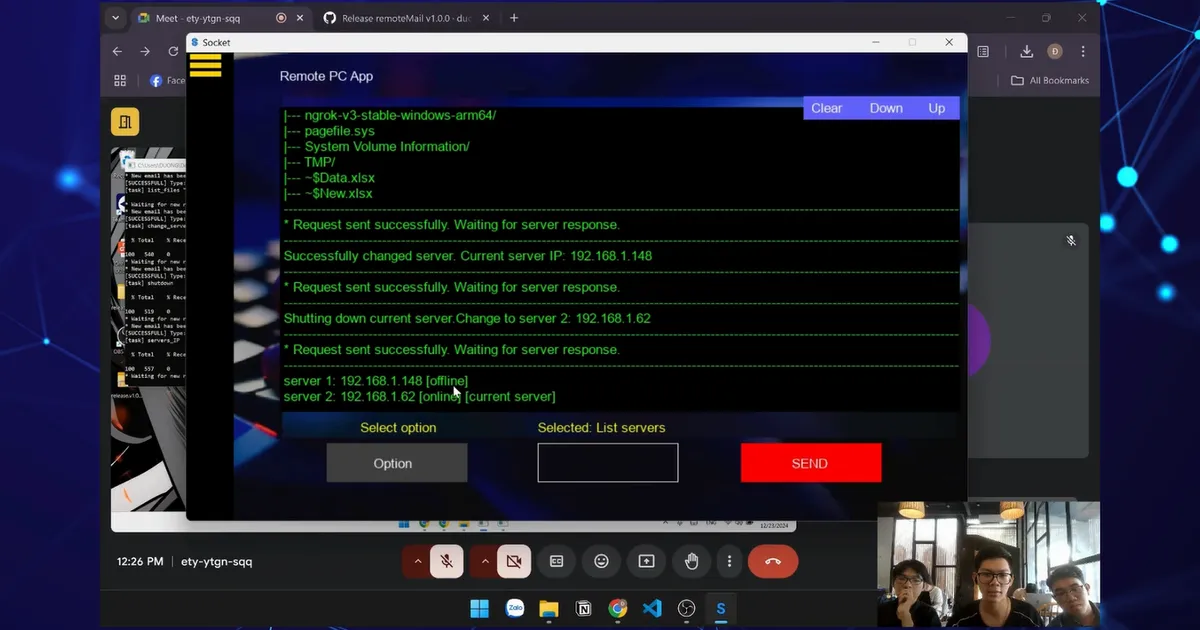
Instead of a simple command-line tool, we built a fully functional Graphical User Interface (GUI) using SDL2 (Simple DirectMedia Layer).
The client interface includes:
- A Login/Registration screen.
- A Remote Control dashboard with a Sidebar for navigation.
- Buttons for executing predefined commands (Show apps, Shutdown, Take Screenshot, etc.).
- A Log Console that renders the feedback received from the servers using
SDL2_ttf.